> ## Documentation Index
> Fetch the complete documentation index at: https://learn.breezing.io/llms.txt
> Use this file to discover all available pages before exploring further.
# Breezing API Reference
> Learn how to use the Breezing API for crypto accounting workflows across companies, transactions, wallets, contacts, reports, rules, and more.
The Breezing Public API gives you programmatic access to your crypto accounting data. Use it to build custom integrations, automate workflows, or connect AI agents to your Breezing workspace.
### Authentication
All API requests require a Bearer token in the `Authorization` header. API keys use the `brz_` prefix.
```bash theme={null}
curl -H "Authorization: Bearer brz_your_api_key" \
https://api.breezing.io/v1/companies
```
Each API key carries a per-company **access level**: `read` (GET requests only) or `write` (GET, POST, and PATCH). The API exposes no DELETE operations; use the Breezing dashboard for destructive actions. Calls to write endpoints with a read-only key return `403 FORBIDDEN`.
### Creating an API Key
API keys are managed at the user level. A single key can span multiple companies with specific `read` or `write` access per company.
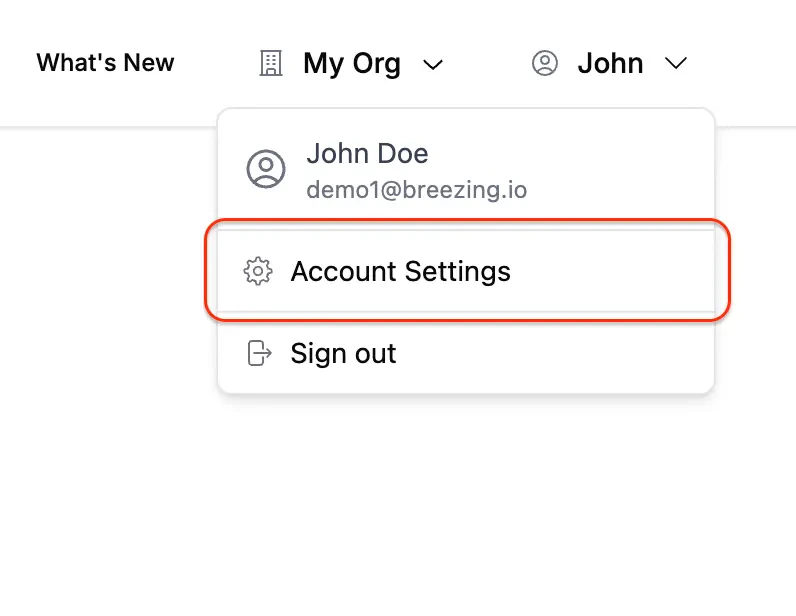
To create one, open the profile menu in the top-right corner and select **Account Settings**:
 Then open the **API Keys** tab and click **Create API Key**:
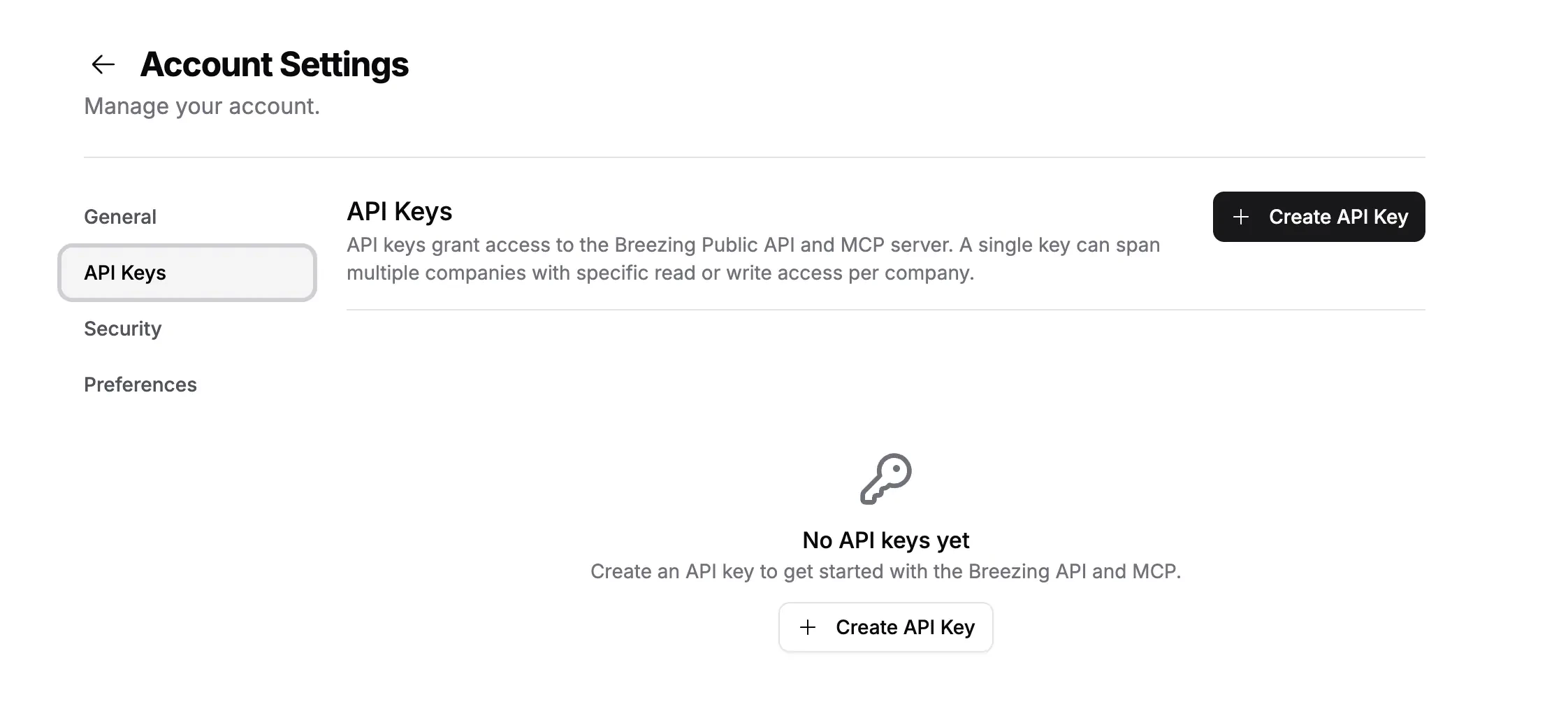 Copy your API key immediately after creation. It won't be shown again. Use the `brz_` prefixed key as a Bearer token in all API requests.
### Base URL
All endpoints are served from:
```
https://api.breezing.io/v1
```
### Finding orgId and companyId
Every endpoint except `GET /companies` requires `orgId` and `companyId` as query parameters. Start by calling `GET /companies` to list every company your API key can access. Each entry returns its `id`, `orgId`, and `accessLevel`.
```bash theme={null}
curl -H "Authorization: Bearer brz_your_api_key" \
https://api.breezing.io/v1/companies
```
Then pass those IDs on every other call:
```bash theme={null}
curl -H "Authorization: Bearer brz_your_api_key" \
"https://api.breezing.io/v1/company?orgId=1&companyId=1"
```
Calls missing `orgId` or `companyId`, or using IDs your API key isn't assigned to, return `400 BAD_REQUEST` or `403 FORBIDDEN`.
### Rate Limits
The Breezing API currently allows up to `600 requests per minute`. If you hit the limit, back off briefly and retry your request.
### Pagination
`GET /transactions`, `GET /assets`, `GET /contacts`, `GET /reports`, and `GET /rules` use **cursor-based pagination**:
* `cursor`: the ID of the last item from the previous page (omit for the first page)
* `limit`: number of items to return per page (1 to 100)
The response includes a `pagination` object:
* `pagination.limit`: number of records requested
* `pagination.cursor`: the cursor value for the current page, or `null`
* `pagination.hasMore`: whether another page of results is available
### Long-Running Operations
Some endpoints start a background job instead of returning the result immediately: `POST /transactions`, `POST /transactions/update-price-auto`, `POST /wallets`, `POST /wallets/{id}/sync`, `POST /balances/calculate`, `POST /ngl/calculate`, `POST /active-issues/refresh`, and `POST /rules/apply`. Each job appears as a row in `GET /tasks`. `POST /transactions`, `POST /transactions/update-price-auto`, `POST /wallets`, and `POST /rules/apply` also return the `taskId` directly in the response.
While a job is already running for the same company or wallet, a duplicate call returns `409` with a `TASK_IN_PROGRESS` code. The exception is `POST /wallets`: creating another wallet is always allowed, since each call targets a new wallet. Check `GET /tasks` before starting a new run, and again before reading derived data such as balances or reports, since overlapping runs can corrupt computed state.
The accounting sync endpoints (`POST /xero/sync`, `POST /qbo/sync`, and `POST /bexio/sync`) run synchronously and respond once the journals are accepted or rejected, but they also return `409 TASK_IN_PROGRESS` while a dashboard-initiated batch sync is running for the company.
The report endpoints (`POST /reports/token`, `POST /reports/account`, `POST /reports/explorer-balances`, and `POST /reports/{id}/regenerate`) also run in the background and return the report and task IDs immediately, but parallel report creation is allowed, so they skip the duplicate-run guard. Poll `GET /tasks` or `GET /reports/{id}` until the report leaves `pending`/`progress`, and avoid re-submitting the same parameters while one is pending. `POST /reports/{id}/regenerate` returns `409` only while that report is still generating.
### Error Responses
Errors return `success: false` and an `error` object with `code` and `message`:
```json theme={null}
{
"success": false,
"error": {
"code": "UNAUTHORIZED",
"message": "Invalid API key"
}
}
```
| Status Code | Meaning |
| ----------- | ------------------------------------------------------------------------------------------------- |
| 400 | Bad request: invalid parameters or request body |
| 401 | Unauthorized: invalid or missing API key |
| 403 | Forbidden: insufficient access level or no access to company |
| 404 | Not found: resource does not exist |
| 409 | Conflict: a long-running task is already in progress, or the resource is locked or already exists |
| 429 | Too Many Requests: rate limit exceeded |
| 500 | Internal server error |
### Resources
List the companies your API key can access. Start here to find org and company IDs.
Retrieve a company's accounting configuration and chart of accounts, or update its accounting settings.
Create, list, filter, count, update, group, consolidate, reprice, and lock or unlock crypto transactions, with a per-transaction edit history.
View connected wallets and exchange accounts, create chain wallets, and trigger incremental syncs.
Browse token assets and manage their GL account mappings.
Get aggregated token balances across wallets with fiat valuations.
Label counterparty addresses with names to clarify transaction parties.
Surface uncategorized transactions, missing prices, and broken syncs blocking the close.
Generate, regenerate, and inspect Breezing reports for token, account, and explorer balance reconciliation.
Manage automation rules that auto-categorize transactions based on conditions.
Track active background tasks like wallet syncs, report generation, and rule application.
Recompute realized and unrealized net gain or loss across crypto transactions.
Refresh Xero accounts, categories, and invoices, create a new account, list and book invoice payments, submit gain/loss journals, and sync crypto transactions as journal entries.
Refresh QuickBooks accounts, classes, and entities, create a new account, and sync crypto transactions as journal entries.
Refresh Bexio accounts and sync crypto transactions as journal entries.
Copy your API key immediately after creation. It won't be shown again. Use the `brz_` prefixed key as a Bearer token in all API requests.
### Base URL
All endpoints are served from:
```
https://api.breezing.io/v1
```
### Finding orgId and companyId
Every endpoint except `GET /companies` requires `orgId` and `companyId` as query parameters. Start by calling `GET /companies` to list every company your API key can access. Each entry returns its `id`, `orgId`, and `accessLevel`.
```bash theme={null}
curl -H "Authorization: Bearer brz_your_api_key" \
https://api.breezing.io/v1/companies
```
Then pass those IDs on every other call:
```bash theme={null}
curl -H "Authorization: Bearer brz_your_api_key" \
"https://api.breezing.io/v1/company?orgId=1&companyId=1"
```
Calls missing `orgId` or `companyId`, or using IDs your API key isn't assigned to, return `400 BAD_REQUEST` or `403 FORBIDDEN`.
### Rate Limits
The Breezing API currently allows up to `600 requests per minute`. If you hit the limit, back off briefly and retry your request.
### Pagination
`GET /transactions`, `GET /assets`, `GET /contacts`, `GET /reports`, and `GET /rules` use **cursor-based pagination**:
* `cursor`: the ID of the last item from the previous page (omit for the first page)
* `limit`: number of items to return per page (1 to 100)
The response includes a `pagination` object:
* `pagination.limit`: number of records requested
* `pagination.cursor`: the cursor value for the current page, or `null`
* `pagination.hasMore`: whether another page of results is available
### Long-Running Operations
Some endpoints start a background job instead of returning the result immediately: `POST /transactions`, `POST /transactions/update-price-auto`, `POST /wallets`, `POST /wallets/{id}/sync`, `POST /balances/calculate`, `POST /ngl/calculate`, `POST /active-issues/refresh`, and `POST /rules/apply`. Each job appears as a row in `GET /tasks`. `POST /transactions`, `POST /transactions/update-price-auto`, `POST /wallets`, and `POST /rules/apply` also return the `taskId` directly in the response.
While a job is already running for the same company or wallet, a duplicate call returns `409` with a `TASK_IN_PROGRESS` code. The exception is `POST /wallets`: creating another wallet is always allowed, since each call targets a new wallet. Check `GET /tasks` before starting a new run, and again before reading derived data such as balances or reports, since overlapping runs can corrupt computed state.
The accounting sync endpoints (`POST /xero/sync`, `POST /qbo/sync`, and `POST /bexio/sync`) run synchronously and respond once the journals are accepted or rejected, but they also return `409 TASK_IN_PROGRESS` while a dashboard-initiated batch sync is running for the company.
The report endpoints (`POST /reports/token`, `POST /reports/account`, `POST /reports/explorer-balances`, and `POST /reports/{id}/regenerate`) also run in the background and return the report and task IDs immediately, but parallel report creation is allowed, so they skip the duplicate-run guard. Poll `GET /tasks` or `GET /reports/{id}` until the report leaves `pending`/`progress`, and avoid re-submitting the same parameters while one is pending. `POST /reports/{id}/regenerate` returns `409` only while that report is still generating.
### Error Responses
Errors return `success: false` and an `error` object with `code` and `message`:
```json theme={null}
{
"success": false,
"error": {
"code": "UNAUTHORIZED",
"message": "Invalid API key"
}
}
```
| Status Code | Meaning |
| ----------- | ------------------------------------------------------------------------------------------------- |
| 400 | Bad request: invalid parameters or request body |
| 401 | Unauthorized: invalid or missing API key |
| 403 | Forbidden: insufficient access level or no access to company |
| 404 | Not found: resource does not exist |
| 409 | Conflict: a long-running task is already in progress, or the resource is locked or already exists |
| 429 | Too Many Requests: rate limit exceeded |
| 500 | Internal server error |
### Resources
List the companies your API key can access. Start here to find org and company IDs.
Retrieve a company's accounting configuration and chart of accounts, or update its accounting settings.
Create, list, filter, count, update, group, consolidate, reprice, and lock or unlock crypto transactions, with a per-transaction edit history.
View connected wallets and exchange accounts, create chain wallets, and trigger incremental syncs.
Browse token assets and manage their GL account mappings.
Get aggregated token balances across wallets with fiat valuations.
Label counterparty addresses with names to clarify transaction parties.
Surface uncategorized transactions, missing prices, and broken syncs blocking the close.
Generate, regenerate, and inspect Breezing reports for token, account, and explorer balance reconciliation.
Manage automation rules that auto-categorize transactions based on conditions.
Track active background tasks like wallet syncs, report generation, and rule application.
Recompute realized and unrealized net gain or loss across crypto transactions.
Refresh Xero accounts, categories, and invoices, create a new account, list and book invoice payments, submit gain/loss journals, and sync crypto transactions as journal entries.
Refresh QuickBooks accounts, classes, and entities, create a new account, and sync crypto transactions as journal entries.
Refresh Bexio accounts and sync crypto transactions as journal entries.