

Authentication
All API requests require a Bearer token in theAuthorization header. API keys use the brz_ prefix.
read (GET requests only) or write (GET, POST, and PATCH). The API exposes no DELETE operations; use the Breezing dashboard for destructive actions. Calls to write endpoints with a read-only key return 403 FORBIDDEN.
Creating an API Key
API keys are managed at the user level. A single key can span multiple companies with specificread or write access per company.
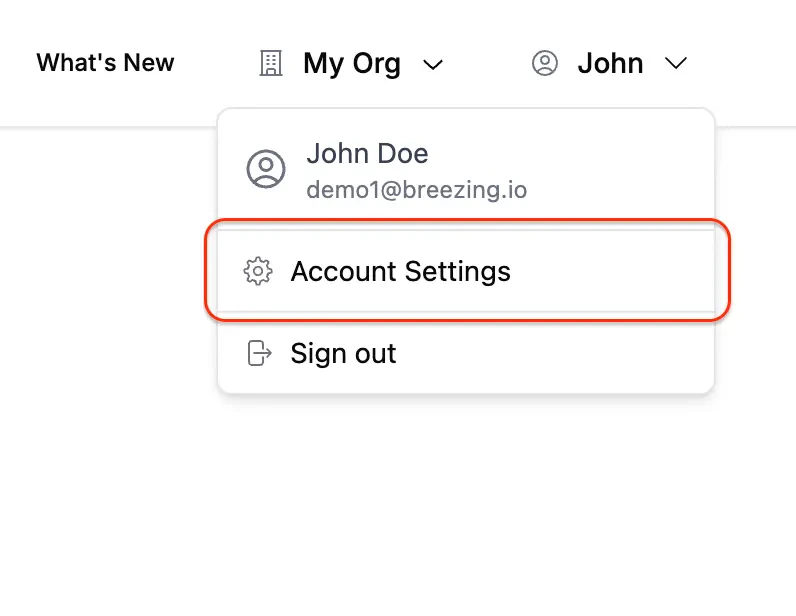
To create one, open the profile menu in the top-right corner and select Account Settings:
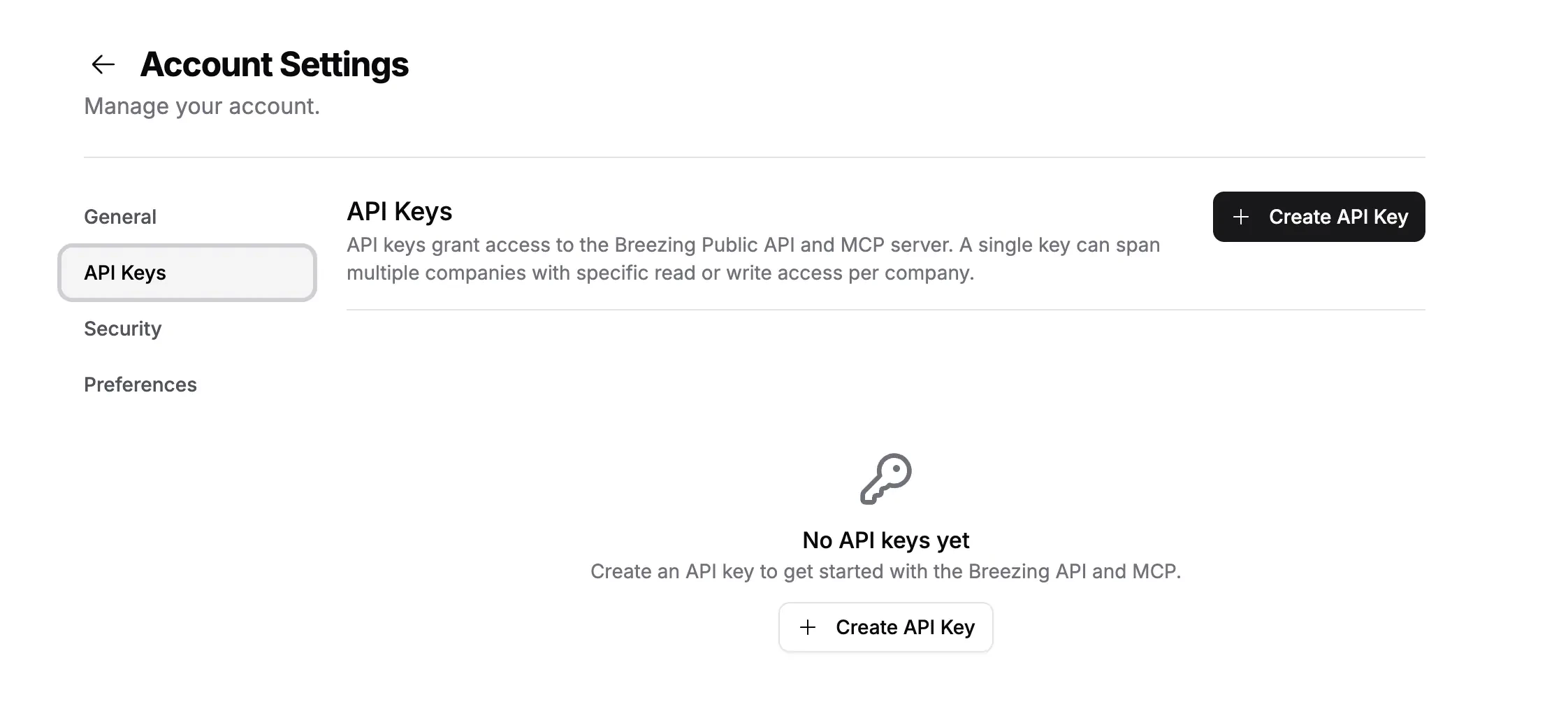
brz_ prefixed key as a Bearer token in all API requests.
Base URL
All endpoints are served from:Finding orgId and companyId
Every endpoint exceptGET /companies requires orgId and companyId as query parameters. Start by calling GET /companies to list every company your API key can access. Each entry returns its id, orgId, and accessLevel.
orgId or companyId, or using IDs your API key isn’t assigned to, return 400 BAD_REQUEST or 403 FORBIDDEN.
Rate Limits
The Breezing API currently allows up to600 requests per minute. If you hit the limit, back off briefly and retry your request.
Pagination
GET /transactions, GET /assets, GET /contacts, GET /reports, and GET /rules use cursor-based pagination:
cursor: the ID of the last item from the previous page (omit for the first page)limit: number of items to return per page (1 to 100)
pagination object:
pagination.limit: number of records requestedpagination.cursor: the cursor value for the current page, ornullpagination.hasMore: whether another page of results is available
Long-Running Operations
Some endpoints start a background job instead of returning the result immediately:POST /transactions, POST /transactions/update-price-auto, POST /wallets, POST /wallets/{id}/sync, POST /balances/calculate, POST /ngl/calculate, POST /active-issues/refresh, and POST /rules/apply. Each job appears as a row in GET /tasks. POST /transactions, POST /transactions/update-price-auto, POST /wallets, and POST /rules/apply also return the taskId directly in the response.
While a job is already running for the same company or wallet, a duplicate call returns 409 with a TASK_IN_PROGRESS code. The exception is POST /wallets: creating another wallet is always allowed, since each call targets a new wallet. Check GET /tasks before starting a new run, and again before reading derived data such as balances or reports, since overlapping runs can corrupt computed state.
The accounting sync endpoints (POST /xero/sync, POST /qbo/sync, and POST /bexio/sync) run synchronously and respond once the journals are accepted or rejected, but they also return 409 TASK_IN_PROGRESS while a dashboard-initiated batch sync is running for the company.
The report endpoints (POST /reports/token, POST /reports/account, POST /reports/explorer-balances, and POST /reports/{id}/regenerate) also run in the background and return the report and task IDs immediately, but parallel report creation is allowed, so they skip the duplicate-run guard. Poll GET /tasks or GET /reports/{id} until the report leaves pending/progress, and avoid re-submitting the same parameters while one is pending. POST /reports/{id}/regenerate returns 409 only while that report is still generating.
Error Responses
Errors returnsuccess: false and an error object with code and message:
Resources
Companies
List the companies your API key can access. Start here to find org and company IDs.
Company
Retrieve a company’s accounting configuration and chart of accounts, or update its accounting settings.
Transactions
Create, list, filter, count, update, group, consolidate, reprice, and lock or unlock crypto transactions, with a per-transaction edit history.
Wallets
View connected wallets and exchange accounts, create chain wallets, and trigger incremental syncs.
Assets
Browse token assets and manage their GL account mappings.
Balances
Get aggregated token balances across wallets with fiat valuations.
Contacts
Label counterparty addresses with names to clarify transaction parties.
Active Issues
Surface uncategorized transactions, missing prices, and broken syncs blocking the close.
Reports
Generate, regenerate, and inspect Breezing reports for token, account, and explorer balance reconciliation.
Rules
Manage automation rules that auto-categorize transactions based on conditions.
Tasks
Track active background tasks like wallet syncs, report generation, and rule application.
Gain/Loss
Recompute realized and unrealized net gain or loss across crypto transactions.
Xero
Refresh Xero accounts, categories, and invoices, create a new account, list and book invoice payments, submit gain/loss journals, and sync crypto transactions as journal entries.
QuickBooks
Refresh QuickBooks accounts, classes, and entities, create a new account, and sync crypto transactions as journal entries.
Bexio
Refresh Bexio accounts and sync crypto transactions as journal entries.